Support for Mirage 3 - JoyHub

Hello!

I recently purchased the Mirage 3 and wanted to connect to Intiface, but it looks like it’s not supported. I couldn’t find any trace of this masturbator on IoST, but here is an Amazon Link:

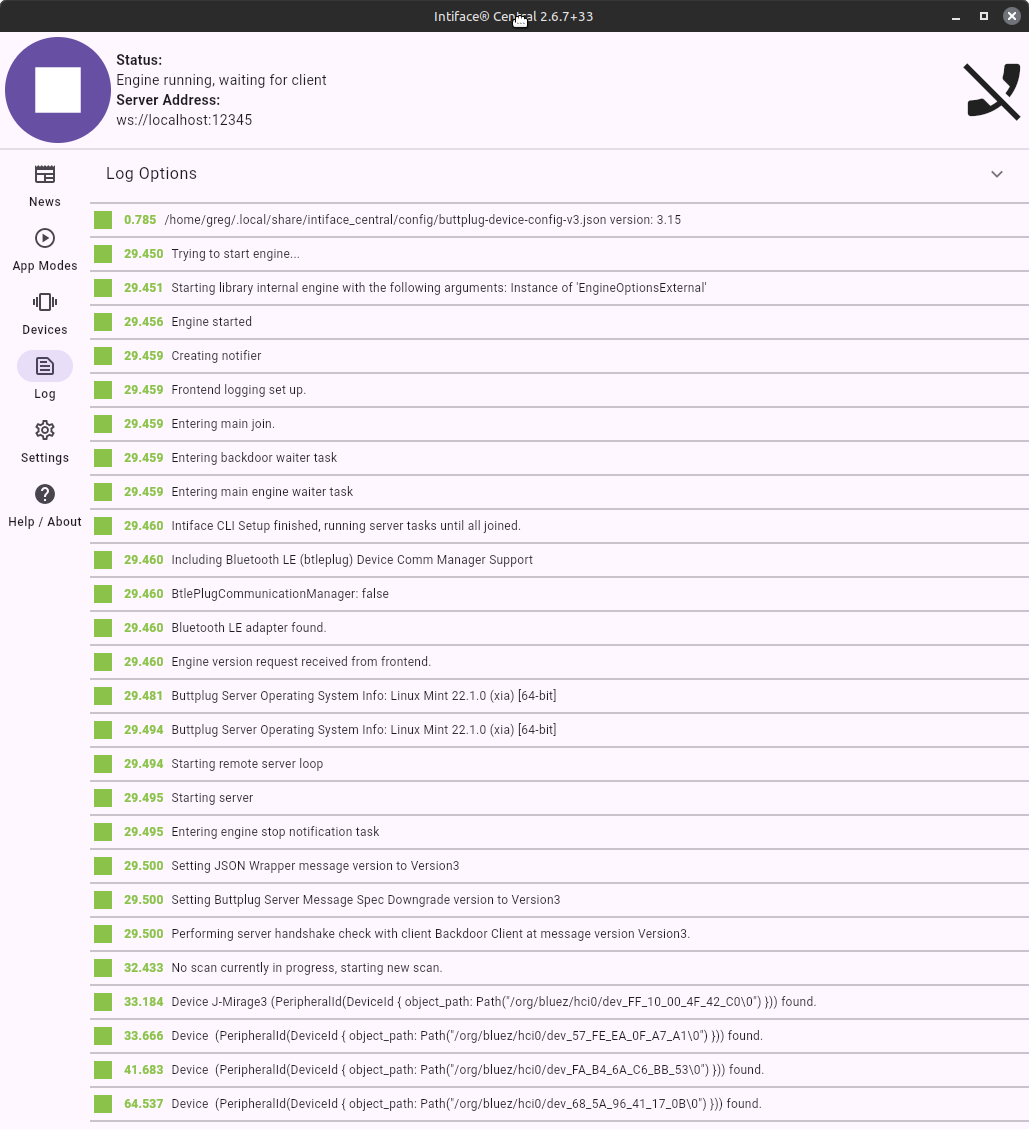
Here is the intiface log, where you can see it recognizes it as J-Mirage3.

I am new to all this. It connects ok to my Joyhub app… I’m willing to provide any additional info to help.

I see there’s issue ongoing to add support for it.

However user didn’t report anything about vibration. So if you could run tests.

You should be able to connect to they toy via console/terminal to check what services are enabled. (Bluetooth commands - Ubuntu Core documentation)

bluetoothctl
devices

You should see your toy appearing under FF:10:00:4F:42:C0 address as your screen shows.

If you don’t see the device you can start the scan

scan on

and then turn if off if you have some other devices spamming log

scan off

If you see the device you should be able to connect to it

connect FF:10:00:4F:42:C0

You should get Connection successful message followed by list of Services with their Characteristics and Destriptors

enter gatt command menu

menu gatt

select-attribute 0000ffa1-0000-1000-8000-00805f9b34fb

So first byte test, using value of 60. you can swap for 255 for full stregth. Remember to put quotes.
This one should rotate and stop after sending second write.

write ‘0xA0 0x03 60 0 0 0 0xAA’
write ‘0xA0 0x03 0 0 0 0 0xAA’

Second:

write ‘0xA0 0x03 0 60 0 0 0xAA’
write ‘0xA0 0x03 0 0 0 0 0xAA’

Third:

write ‘0xA0 0x03 0 0 60 0 0xAA’
write ‘0xA0 0x03 0 0 0 0 0xAA’

and fourth:

write ‘0xA0 0x03 0 0 0 60 0xAA’
write ‘0xA0 0x03 0 0 0 0 0xAA’

One of these should start vibration, unless manufacturer put it somewhere else.

would be nice to check how many level of suction work

write ‘0xA0 0x0D 0 0 1 0xFF’
write ‘0xA0 0x0D 0 0 2 0xFF’

increase it by 1 until it will stop go faster (in theory 7 should be max),
and stop it

write ‘0xA0 0x0D 0 0 0 0xFF’

With all information implementation of these into app will be possible or even before that you will be able to create own custom config (if findings will be compatible with what’s in code)

Hello, thank you for the fast reply!
I followed your instructions and I am happy to report back!

After entering gatt command I found that writing to first byte changes rotation speed. 60 is middle, 255 is indeed fastest.
Second and third byte do nothing.
Fourth byte controls vibration. Again, 255 is indeed fastest.

As for the suction, all 7 levels of suction work, increasing it by 1 every time. Levels 4-7 are less suction strength and more like suction modes, kinda like a rhythm. The same happens when pushing the physical buttons on the device. I also tried writing level 8 and 9 but there is no suction - only the suction icon on the device lights up and the corresponding number on the LCD appears. I didn’t go higher than 9.

It should be noted that pushing the physical buttons for the rotation and the vibration also triggers various modes and patterns. E-g: level 1 and 2 are only different rotation speed while from level three on it also inverts the rotation every so often, depending on the number. Same goes for vibration.

Do you know which bits should be written to achieve the different vibration and rotation modes?

So far i don’t see any joyhub protocol fully compatible with all the features at once in these bits. Only v4 has option to send command in 4th byte, but it addresses suction to A007, instead to A00D` buttplug/buttplug/src/server/device/protocol/joyhub_v4.rs at master · buttplugio/buttplug · GitHub

It seems it will be needed to add new protocol in code (or add capabilities to more easily adjust addressing in config).

As further debugging options go to find more functionalities.

  1. You can try writing values like 0xA0 0x01 x x x x 0xFF or 0xA0 0x06 x x x x 0xFF etc.
    These can have similar effects of selecting preset action as button / remote for the toy. However I think it’s not a scope of the application, where it’s rather for achieving that with application contacting server and just sending commands dynamically adjusting speeds to achieve that.

  2. You can try to subscribe to bluetooth endpoint, some toys report back on it what command they executed. It should be the command notify where you’re in gatt menu in bluetoothctl and the attribute with that should be 0000ffa2-0000-1000-8000-00805f9b34fb.

  3. Using the original app and export/sniff bluetooth connection packets sent using original application. It can be done with android phone with developer settings on and enabling bluetooth hci logs, then exporting them on desktop via usb debug and apt tool.

So far what can we do to help?

Has anyone figured out how to connect Mirage 3 to sites like FapTap?

I also recently bought a Mirage 3 and got interested in Funscript.

On FapTap, Mirage 3 connects via Connect > Intiface, but FapTap only transmits vibration commands.

So I made a Tampermonkey script that adds rotation, sucking, and a few settings.

Script
// ==UserScript==
// @name         FapTap JoyHub Mirage 3
// @version      1.0
// @description  Mirage 3 Advanced Controls
// @match        *://faptap.net/*
// @run-at       document-start
// @grant        none
// ==/UserScript==

(function() {
    'use strict';

    const STORAGE_KEY = 'mirage_settings';

    window.mirageConfig = loadSettings();

    function loadSettings()
    {
        const saved = localStorage.getItem(STORAGE_KEY);
        return saved ? JSON.parse(saved) :
        {
            vibrate: 1.0, rotate: 1.0, rotate_th: 0.2, constrict: 0.5,
            v_on: true, r_on: true, c_on: false
        };
    }

    function saveSettings()
    {
        localStorage.setItem(STORAGE_KEY, JSON.stringify(window.mirageConfig));
    }

    function createUI() {
        const div = document.createElement('div');
        div.style = "position:fixed;top:50px;left:25px;z-index:99999;background:#0f0f0f;color:white;padding:12px;border:1px solid white;font-family:monospace;border-radius:10px;box-shadow:0 0 5px white;";
        div.innerHTML = `
            <div style="margin-bottom:16px;text-align:center;font-weight:bold;border-bottom:1px solid white">MIRAGE 3 CONTROL</div>
            <div style="margin-bottom:8px;">
                <input type="checkbox" id="m_v_on"> VIBRATE - <span id="val_v"></span>
            </div>
            <div style="margin-bottom:8px;">
                <input type="range" id="v_p" min="0" max="1.5" step="0.05" value="0" style="width:200px">
            </div>
            <div style="margin-bottom:8px;">
                <input type="checkbox" id="m_r_on"> ROTATE - <span id="val_r"></span>
            </div>
            <div style="margin-bottom:8px;">
                <input type="range" id="r_p" min="0" max="1.5" step="0.05" value="0" style="width:200px">
            </div>
            <div style="margin-bottom:8px;"> ROTATION THRESHOLD - <span id="val_r_th"></span>
            </div>
            <div style="margin-bottom:8px;">
                <input type="range" id="r_th" min="0" max="1.0" step="0.05" value="0" style="width:200px">
            </div>
            <div style="margin-bottom:8px;">
                <input type="checkbox" id="m_c_on"> SUCKING
            </div>
            <div style="margin-bottom:8px;">SUCKING THRESHOLD - <span id="val_c"></span>
            </div>
            <div style="margin-bottom:8px;">
                <input type="range" id="c_th" min="0" max="1.0" step="0.05" value="0" style="width:200px">
            </div>
        `;
        document.body.appendChild(div);


        function setupCheckBox(key) {
            const element = document.getElementById(`m_${key}`);
            if (!element) return;

            element.checked = !!window.mirageConfig[key];

            element.addEventListener('change', (e) => {
                window.mirageConfig[key] = e.target.checked;
                saveSettings();
            });
        }

        ['v_on', 'r_on', 'c_on'].forEach(setupCheckBox);


        function setupSlider(sliderId, textId, configKey) {
            const slider = document.getElementById(sliderId);
            slider.value = window.mirageConfig[configKey];

            const text = document.getElementById(textId);
            text.innerText = window.mirageConfig[configKey];

            slider.addEventListener('input', (e) => {
                const val = e.target.value;
                window.mirageConfig[configKey] = parseFloat(val);
                text.innerText = val;
                saveSettings();
            });
        }

        setupSlider('v_p', 'val_v', 'vibrate');
        setupSlider('r_p', 'val_r', 'rotate');
        setupSlider('r_th', 'val_r_th', 'rotate_th');
        setupSlider('c_th', 'val_c', 'constrict');
    }

    setTimeout(createUI, 1000);

    const OriginalWebSocket = window.WebSocket;
    window.WebSocket = function(url, protocols) {
        const ws = new OriginalWebSocket(url, protocols);
        const originalSend = ws.send;

        ws.send = function(data) {
            try {
                let msgs = JSON.parse(data);
                msgs.forEach(msg => {
                    if (msg.ScalarCmd && msg.ScalarCmd.Scalars) {

                        const rawVal = msg.ScalarCmd.Scalars[0].Scalar;
                        const conf = window.mirageConfig;

                        let newScalars = [];

                        // 1. VIBRATE
                        newScalars.push({ Index: 1, Scalar: conf.v_on ? Math.min(1.0, rawVal * conf.vibrate) : 0, ActuatorType: "Vibrate"});

                        // 2. ROTATE
                        let rotatePower = 0;
                        if (conf.r_on && rawVal >= conf.rotate_th) {
                            rotatePower = Math.min(1.0, rawVal * conf.rotate);
                        }
                        newScalars.push({ Index: 0, Scalar: rotatePower, ActuatorType: "Rotate"});

                        // 3.SUCKING
                        let suctionPower = 0;
                        if (conf.c_on && rawVal >= conf.constrict) {
                            suctionPower = rawVal;
                        }
                        newScalars.push({ Index: 2, Scalar: suctionPower, ActuatorType: "Constrict" });

                        msg.ScalarCmd.Scalars = newScalars;
                    }
                });
                data = JSON.stringify(msgs);
            } catch (e) {}
            return originalSend.apply(this, [data]);
        };
        return ws;
    };
    window.WebSocket.prototype = OriginalWebSocket.prototype;
})();

Most likely, this script will also work with other JoyHub devices that have the same features.

Hi LesnoyBiba,

Thank you very much for sharing your Tampermonkey script. I have Intiface Central downloaded and am looking forward to testing it with my Mirage 3 to see how it handles the additional rotation and suction features.

As this is my first time using the software, could you provide some guidance on the best way to discover the device within Intiface Central? Any specific tips or steps for the initial setup process to ensure the script and device communicate correctly would be greatly appreciated.

Thank you again for your help.

Best regards,

AC

Hi acappadora

First, in Intiface Central, you need to click Start Server. Then, go to the Devices tab and click Start Scanning. If Bluetooth is enabled, Mirage 3 will appear there.

For the script, install the Tampermonkey extension. Click on it in your extensions tab and select Create a new script. Copy and paste the script there, then click File > Save.

Now, when you open FapTap, a settings window will appear on the left. To connect Intiface, click Connect > Intiface > Connect in the top right corner.

The main thing is not to open videos in new tabs on FapTap, as the Intiface connection is linked to one tab only.
Hope everything works out!

I’m thinking I bought a knockoff from Amazon because when I try to connect on Intiface nothing shows up but when I look at a log I see “J-Mega”

and then I was able to see it when I tried using my phone as J-Mega as well.